Introduction
A la recherche du wapiti is a 3-star challenge from the FCSC. Here is the statement:
While traveling in northern China, you find sensors in your accommodation.
These are based on ESP32C3, but they seem to speak a language you do not understand.

Armed with your Wi-Fi card and your tools, you manage to retrieve the firmware from one of the ESP32 devices.
We are provided with the firmware of an ESP32-C3 device and a pcap of the Wi-Fi traffic.
Reconnaissance
Wi-Fi traffic
Looking at the pcap, we can already identify one device with the MAC address ce:e0:02:83:6d:12 broadcasting Beacon frames, and another one with the MAC address dc:da:0c:d3:36:30 sending data to it. So the first one is most likely the Access Point, and the second one a client.
A third device with the MAC address dc:da:0c:d3:36:30 is also sending some frames, but only in broadcast or to the other client.
The frames are not really useful for the moment. I can see some WAI frames, and since they seem to establish keys, it is a good sign that the data frames are probably encrypted after that.
After some research, I find that the network is using WAPI, which is a Chinese Wi-Fi security protocol.
So apparently there is more than just WEP/WPA????

I decide to leave this aside for the moment and have a look at the firmware, because the situation is probably just the device talking to the AP and I need to understand the rest, and what the device actually does.
Firmware
The first thing to do is to run file and strings on the firmware:
1file firmware.bin
2firmware.bin: ESP-IDF application image for ESP32-C3, project name: "wapiti", version 1, compiled on Feb 14 2026 21:16:30, IDF version: v5.5.1, entry address: 0x403803F2
So we already get some useful information here. The strings output also gives a few hints: there is some mqtt activity, with the URL mqtt://wapiti.
This already gives me a rough picture of the device, so I decide to emulate the firmware.
Emulation
Using Wokwi, I emulate the firmware to see what is actually going on. We can see some logs:
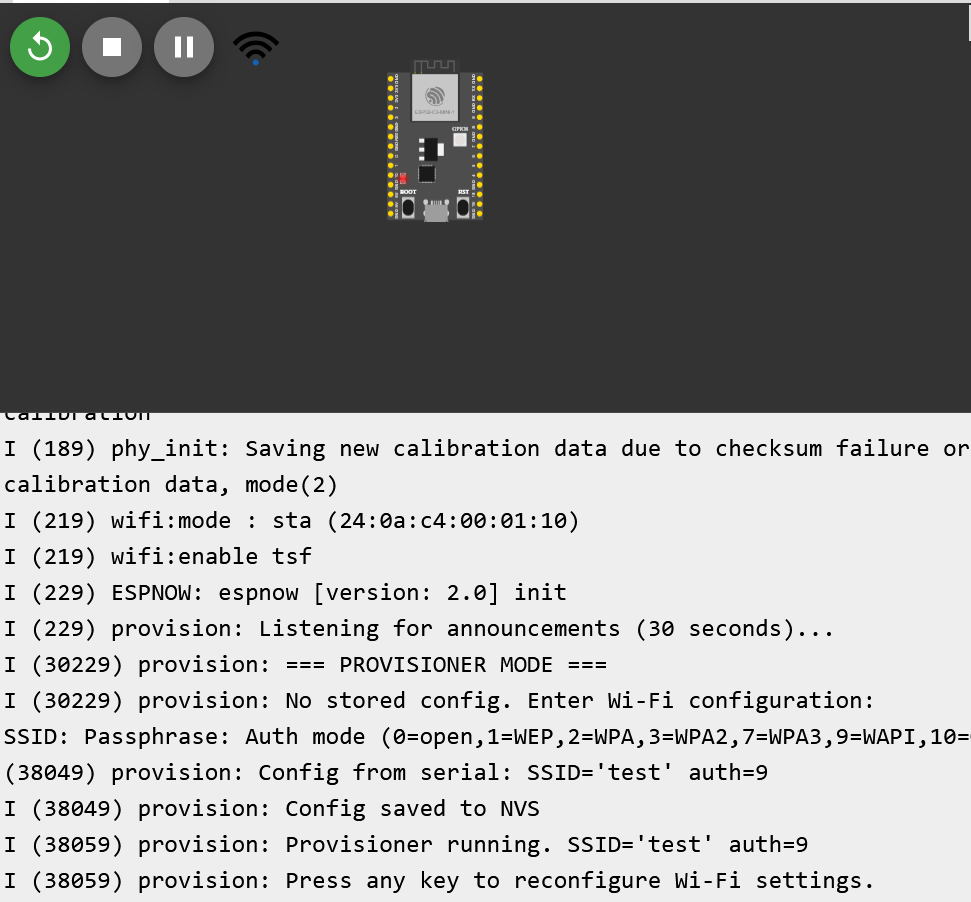
This is interesting. The device seems to follow these steps:
- It starts by listening for announcements for 30 seconds. In our case, we cannot provide any, so it just waits.
- It then enters provisioning mode and, since there is no stored configuration, asks for Wi-Fi settings: SSID, passphrase, and auth mode.
- Finally, it stores the configuration in NVS (the storage part of the memory) and starts with the provided settings.
There is not much more I can do with the emulation for now, so I move on to the decompilation.
Reverse
I found a Ghidra extension that supports ESP32-C3 firmware, which is really useful. I need an older version of Ghidra to use it, but honestly that is a sacrifice I am willing to make.
I spent some time poking around the binary, looking for something interesting, but besides from some strings, the listening mode, and the MQTT-related code, I did not find anything interestting (saying this as if I did not spend hours staring at code for almost nothing ahah… ahah…).
Still, it helped me understand the overall flow of the firmware.
So I went back to the Wi-Fi traffic, this time with a better idea of what I should actually be looking for.
WAPI protocol
The WAPI protocol is not the most documented one; there is pretty much nothing on a first search when you are looking for detailed documentation.
Before going further, one thing is important because I got confused myself at first:
- WAPI is the overall wireless security architecture.
- Inside WAPI, the authentication and key negotiation part is called WAI.
At a high level, WAPI is a Chinese security protocol for wireless LANs. It can be seen as an alternative to IEEE 802.11i / WPA-style security. In the model used here, both the client and the AP are authenticated, either with certificates or with a pre-shared key (PSK), and then session keys are derived to protect the data.
For this challenge, that means one of two things:
- either I need a certificate-related secret,
- or I need the PSK / passphrase.
Since the firmware explicitly asks for a passphrase during provisioning, PSK mode looks like the obvious candidate.
The passphrase
The pcap is full of Beacon frames, and we can already recover some useful information:
- The SSID is
wapanda - The proposed cipher suite is only WPI-SMS4
- It only offers PSK authentication
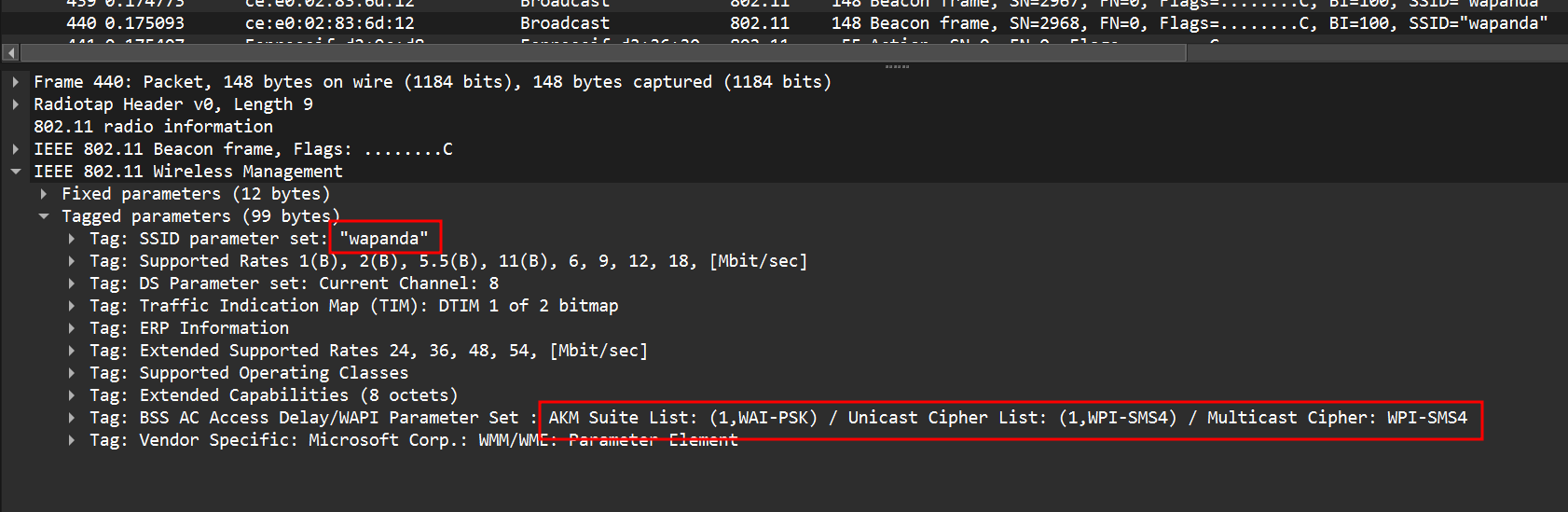
I need to filter out the Beacon frames to look at the rest of the traffic. So for that I will use the following filter in Wireshark:
!(wlan.fc.type_subtype == 0x0008)
Since I have two ESP devices involved, so for clarity I name them:
- the one acting as the client:
client - the one sending configuration data to the client:
provisioner
Looking at the first non-broadcast frame sent by the provisioner to the client, I see that it is an action frame. At this point I have absolutely no idea what it is, so I start reading about Espressif-specific Wi-Fi traffic.
I eventually find that this is most likely an ESP-NOW frame. The documentation says:
ESP-NOW is a kind of connectionless Wi-Fi communication protocol that is defined by Espressif. In ESP-NOW, application data is encapsulated in a vendor-specific action frame and then transmitted from one Wi-Fi device to another without connection.
That matches perfectly.
Cross-referencing this with the firmware and the emulation logs, it becomes pretty clear that this frame is probably carrying the provisioning information: SSID, passphrase, and auth mode.
The format of an ESP-NOW frame is the following:
| MAC Header | Category Code | Organisation ID | Random Values | Vendor Specific Content | FCS |
|---|---|---|---|---|---|
| 24 bytes | 1 byte | 3 bytes | 4 bytes | 7-x bytes | 4 bytes |
Then the vendor-specific content (either v1 or v2, but the difference does not matter much here) looks like this:
| Element Id | Length | Org ID | Type | Reserved/(optional more data on V2)/version | Body |
|---|---|---|---|---|---|
| 1 byte | 1 byte | 3 bytes | 1 byte | 1 byte in total | 0 - 255 bytes |
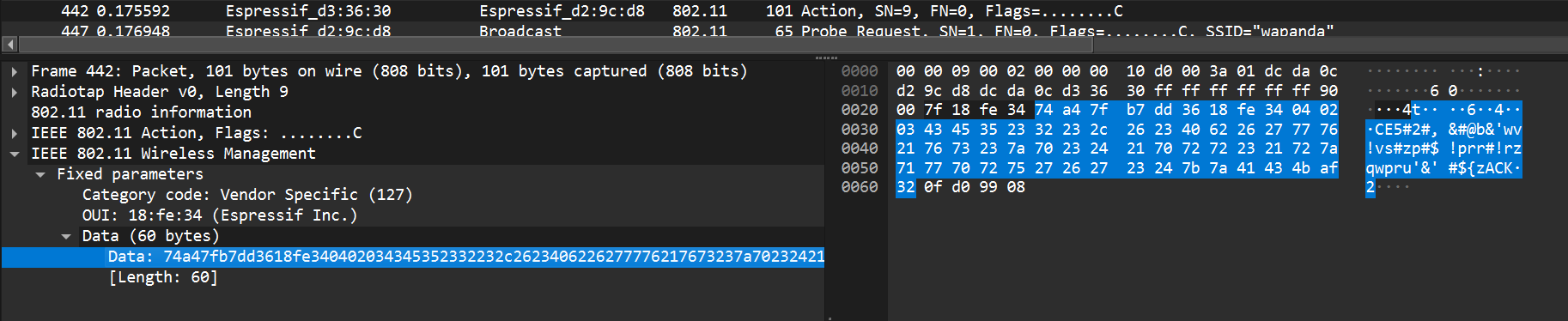
So I start parsing it: Category Code 0x7f, Organisation ID 18:fe:34, random values, then vendor-specific content.
And then… nothing makes sense.
There is nothing in the documentation suggesting that the body should be encrypted, so I should be able to spot the SSID or some recognizable structure. But I find nothing.
So, like any normal person who really does not want to go back to reverse engineering, I removed the first 11 bytes to isolate the body, remove the FCS, throw the result into random tools, try dcode, try CyberChef, and eventually hit XOR bruteforce.
That gives me this:
Key = 42: A%01%07wapanda%02%20de54c41a82afc200ac0835207edeaf98%03%01%09
So the data is simply XORed with the key 42, and now everything suddenly looks much better: I have the SSID, the passphrase, and the auth mode.
The data is split into three blocks with the format <index><length><data>, so it is easy to parse:
SSID = %01%07wapanda
Passphrase = %02%20de54c41a82afc200ac0835207edeaf98
Auth = %03%01%09
So now I have the passphrase:
de54c41a82afc200ac0835207edeaf98
Nice. Time to break some Chinese Wi-Fi.
The WAPI protocol
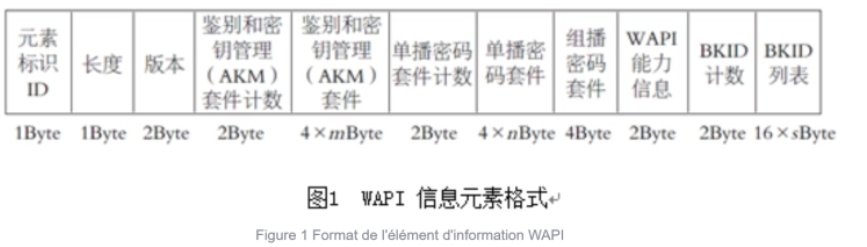
This was honestly the most annoying part at the beginning: finding documentation that is both detailed enough and actually useful.
Using ChatGPT, I eventually found this link , which gives a complete enough description of the protocol and, more importantly for the challenge, of the key negotiation process.
Before that, I was trying to learn Chinese and understand a Huawei article, but it was not detailed enough to recompute the key negotiation process. With this documentation, I finally had everything I needed.
I tried to rush instead of taking the time to understand the protocol, so I lost some time, but then I started again more slowly. Here are the steps.
Since the provisioning step gave us a passphrase, we are dealing with WAI-PSK here.
I will not rewrite the full protocol specification in this write-up, but only the parts that were useful for solving the challenge.
Unicast key negotiation
The first step after the association of the client to the AP is the unicast key negotiation. This process allows the client and the AP to establish a unicast key that will be used to encrypt the data frames.
A multicast key is also negotiated afterwards, but for this challenge I only need the unicast traffic, so that is where I focus.
The process is the following:
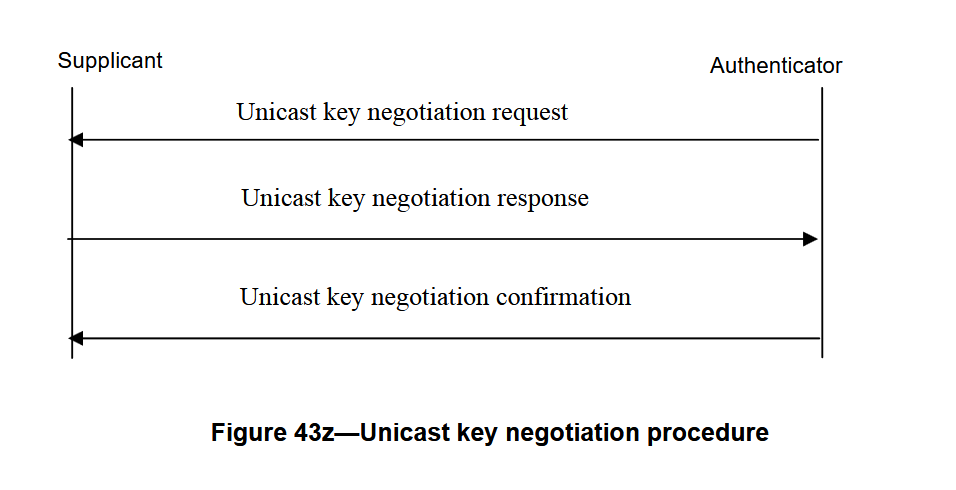
The key negotiation request
The frame for the unicast key negotiation request is the following:

The supplicant generates a random 32-byte value N2 and sends it to the AP. The AP already has its own random challenge N1.
Using these values, both parties derive 96 bytes of key material with:
KD_HMAC_SHA256 (BK, ADDID||N1||N2||"pairwise key expansion for unicast and additional keys and nonce")
Where:
BKis the base keyADDIDis the concatenation of both MAC addressesN1is the authenticator challenge generated by the APN2is the supplicant challenge- the final ASCII string is part of the derivation input
One thing that confused me at first: BK is not just the passphrase.
My first mistake here was to think that BK was just the passphrase. Luckily, in the 96 bytes that we compute, we have an integrity key that allows us to verify that we computed the right key.
It allowed me to quickly verify that I was completely wrong.
So I spent some time there and then found how BK is computed:
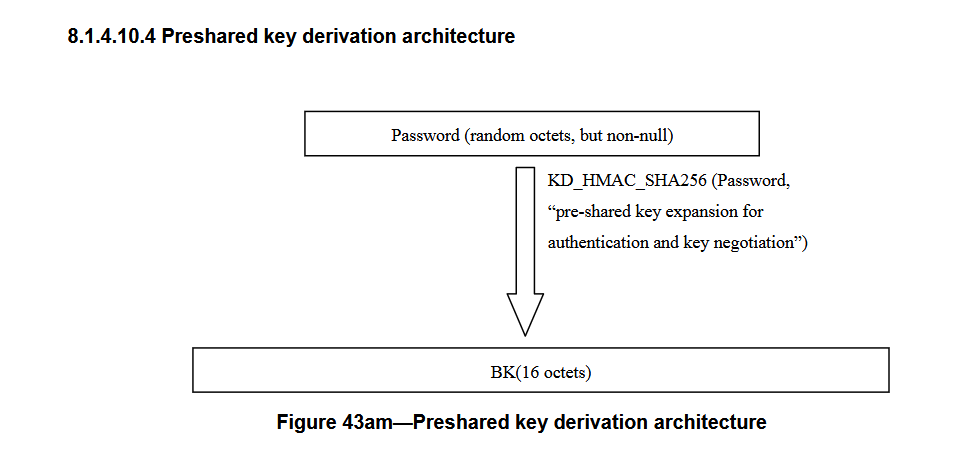
But what is KD_HMAC_SHA256?
The function is described in the documentation, and I also found a reimplementation , which helped a lot in understanding the derivation process.
 1void KD_hmac_sha256(byte *text,unsigned text_len,byte *key,unsigned key_len,byte *output,unsigned
 2length)
 3/*
 4a) byte *text , indicates the input text of the key derivation algorithm
 5b) unsigned text_len , indicates the length of the input text (in octet)
 6c) byte *key, indicates the input key of the key derivation algorithm
 7d) unsigned key_len , indicates the length of the input key (in octet)
 8e) byte *output , indicates the output of the key derivation algorithm
 9f) unsigned length , indicates the length of the output of the key derivation algorithm (in octet).
10*/
11{
12    int i;
13    for(i = 0; length / SHA256_DIGEST_SIZE; i++,length -= SHA256_DIGEST_SIZE) {
14    hmac(MHASH_SHA256, text, text_len, key, key_len,&output[i*SHA256_DIGEST_SIZE], SHA256_DIGEST_SIZE);
15    text = &output[i*SHA256_DIGEST_SIZE];
16    text_len = SHA256_DIGEST_SIZE;
17    }
18    if(length>0)
19        hmac(MHASH_SHA256, text, text_len, key,key_len, &output[i*SHA256_DIGEST_SIZE], length);
20}
So I rewrote it in Python and used it to recompute BK:
 1import hmac
 2import hashlib
 3
 4SHA_256_DIGEST_SIZE = hashlib.sha256().digest_size
 5
 6def kd_hmac_sha256(key, data, ptk_len):
 7    res = b""
 8    length = ptk_len
 9    i = 0
10
11    while length // SHA_256_DIGEST_SIZE:
12        res += hmac.digest(key, data, "sha256")
13        data = res[i * SHA_256_DIGEST_SIZE : (i + 1) * SHA_256_DIGEST_SIZE]
14        length -= SHA_256_DIGEST_SIZE
15        i += 1
16    if length > 0:
17        res += hmac.digest(key, data, "sha256")
18
19    return res[:ptk_len]
20
21
22PASSPHRASE = "de54c41a82afc200ac0835207edeaf98".encode()
23SUFFIX_BK = b"preshared key expansion for authentication and key negotiation"
24BK = kd_hmac_sha256(PASSPHRASE, SUFFIX_BK, 16)
Now I can compute the unicast key material:
 1AE_MAC = bytes.fromhex("cee002836d12")
 2ASUE_MAC = bytes.fromhex("dcda0cd29cd8")
 3
 4ADDID = AE_MAC + ASUE_MAC
 5
 6AE_CHALLENGE = bytes.fromhex(
 7    "5f51bc9abcfe1b8bb788c3374298520cce5aca09d00409aedf00f3d10276133f"
 8)
 9ASUE_CHALLENGE = bytes.fromhex(
10    "9f0eed52771429fff705ce9cad15952994c2e53fc5454b35a522f878412df6af"
11)
12
13SUFFIX = b"pairwise key expansion for unicast and additional keys and nonce"
14PTK_LEN = 96
15
16
17PTK = kd_hmac_sha256(BK, ADDID + AE_CHALLENGE + ASUE_CHALLENGE + SUFFIX, PTK_LEN)
18
19
20UNICAST_SESSION_KEY = PTK[:64]
21UNICAST_ENCRYPTION_KEY = UNICAST_SESSION_KEY[:16]
22UNICAST_INTEGRITY_KEY = UNICAST_SESSION_KEY[16:32]
23KCK = UNICAST_SESSION_KEY[32:48]
24KEK = UNICAST_SESSION_KEY[48:64]
The 64-byte unicast session key is split into four parts:
- the unicast encryption key, used to encrypt the unicast data frames
- the unicast integrity key used to verify the integrity of the unicast data frames
- the Key Confirmation Key (
KCK), used to authenticate negotiation messages - the Key Encryption Key (
KEK), used for encrypting the multicast key
The key negotiation response
We can check that we computed the right key by looking at the unicast negotiation response frame:
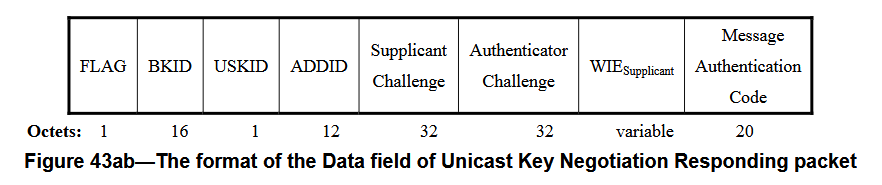
The idea is simple: the frame contains a MAC field computed as an HMAC-SHA256 over the frame content without the MAC field, using KCK as the key. If I recompute the same value, then my derivation is correct.
That is exactly what I do:
1MAC_EXPECTED = bytes.fromhex("813e6e2156a142d39edeaa9d25345820b97bd29d")
2
3FRAME = "0076bafb8e348c0a66af1130c3f240b84700cee002836d12dcda0cd29cd89f0eed52771429fff705ce9cad15952994c2e53fc5454b35a522f878412df6af5f51bc9abcfe1b8bb788c3374298520cce5aca09d00409aedf00f3d10276133f441601000100001472020100001472010014720100000000"
4
5MAC = hmac.digest(KCK, bytes.fromhex(FRAME), "sha256")[:20]
6print(MAC.hex())
7print(MAC == MAC_EXPECTED)
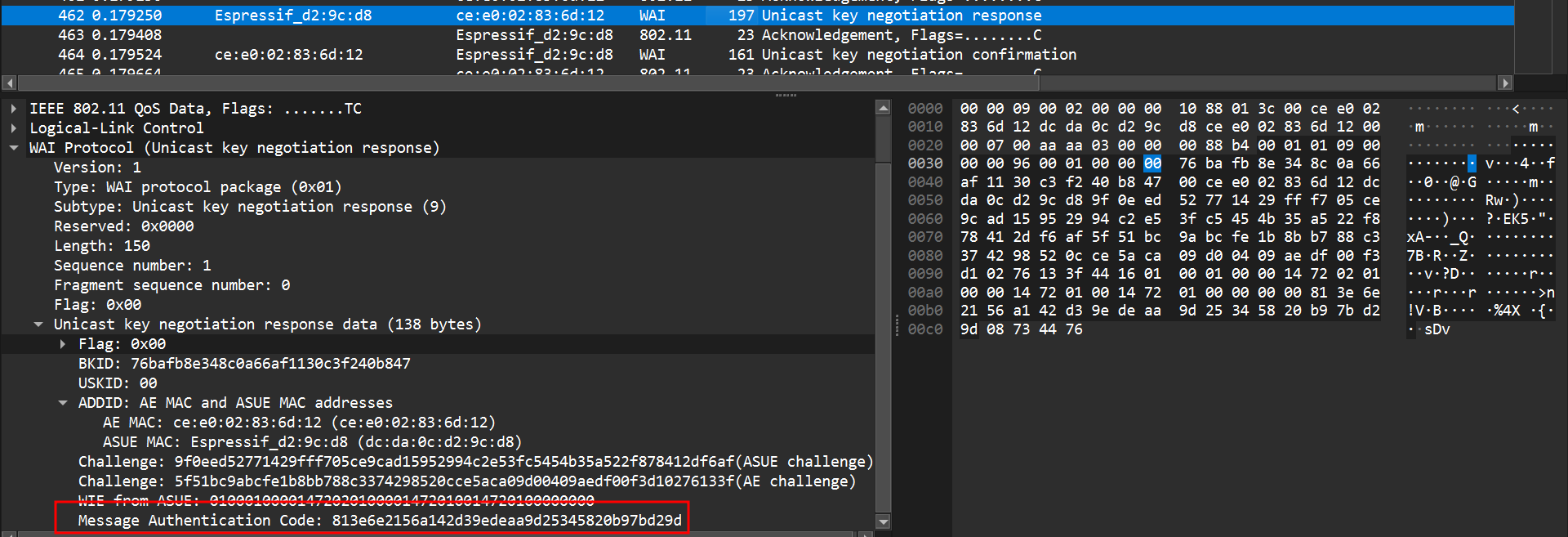
Once I get the expected MAC, I know my key derivation is correct, which is a huge relief but let’s move on.
Then a Unicast Key Negotiation Confirmation frame is sent by the supplicant to the AP to confirm that both sides agree and that the unicast key is established.
After that, a multicast key negotiation also happens. I went through it as well because at that point I was fully locked in the process, but for the challenge it was actually not necessary.
Now that I have the unicast encryption key, I can finally move on to the part I wanted all along: decrypting the frames.
Decrypting the frames
Here is the format of an encrypted frame:
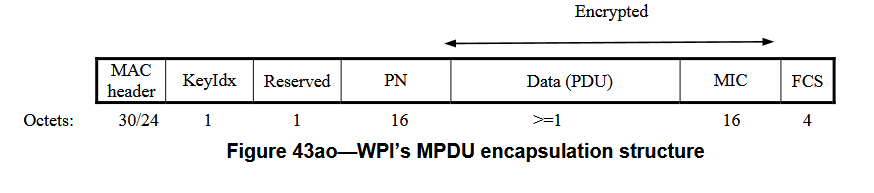
For the decryption, the field I care about is the PN (Packet Number). It is a 16-byte value, incremented for each frame, and used as the IV material for encryption and decryption.
The cipher used here is SMS4 / SM4, so once I have both the key and the IV, I can start decrypting frames.
At first I was not getting anything meaningful. After some time, I realized that the PN has to be reversed to obtain the IV in the form expected by my decryption code.
Here is the decryption snippet:
1from cryptography.hazmat.primitives.ciphers import Cipher, algorithms, modes
2
3cipher = Cipher(algorithms.SM4(key), modes.OFB(IV[::-1]))
4decryptor = cipher.decryptor()
5decrypted = decryptor.update(DATA)
6raw_pkt = decrypted[:-16]
I simply discard the last 16 bytes, since they are the MIC of the protected frame.
After that, I export the frames from Wireshark and run a loop to decrypt them. I just print the recovered data in the terminal, and after some random traffic like DHCP or ARP, I start finally seeing some mqtt traffic:
 1raw_pkt: b'\xaa\xaa\x03\x00\x00\x00\x08\x00E\x00\x001\x00\x01\x00\x00@\x06\xec\x043\xffD\xb6\n\x0b\x0c\x02\x07[\xcf\xf8\x00\x00"\x1e\x94\xde\xf6\xf2P\x18 \x00=\xdf\x00\x000\x07\x00\x04flagF'
 2b'flagF\xd6t\xae'
 3raw_pkt: b'\xaa\xaa\x03\x00\x00\x00\x08\x00E\x00\x00(\x00\x08\x00\x00@\x06\xec\x06\n\x0b\x0c\x023\xffD\xb6\xcf\xf8\x07[\x94\xde\xf6\xf2\x00\x00"\'P\x10\x16n\x85X\x00\x00'
 4raw_pkt: b'\xaa\xaa\x03\x00\x00\x00\x08\x00E\x00\x001\x00\x01\x00\x00@\x06\xec\x043\xffD\xb6\n\x0b\x0c\x02\x07[\xcf\xf8\x00\x00"\'\x94\xde\xf6\xf2P\x18 \x00@\xd6\x00\x000\x07\x00\x04flagC'
 5b'flagC\xcc\xd7\t'
 6raw_pkt: b'\xaa\xaa\x03\x00\x00\x00\x08\x00E\x00\x00(\x00\t\x00\x00@\x06\xec\x05\n\x0b\x0c\x023\xffD\xb6\xcf\xf8\x07[\x94\xde\xf6\xf2\x00\x00"0P\x10\x16e\x85X\x00\x00'
 7raw_pkt: b'\xaa\xaa\x03\x00\x00\x00\x08\x00E\x00\x001\x00\x01\x00\x00@\x06\xec\x043\xffD\xb6\n\x0b\x0c\x02\x07[\xcf\xf8\x00\x00"0\x94\xde\xf6\xf2P\x18 \x000\xcd\x00\x000\x07\x00\x04flagS'
 8b'flagS\x11\xd7\xcc'
 9raw_pkt: b'\xaa\xaa\x03\x00\x00\x00\x08\x00E\x00\x00(\x00\n\x00\x00@\x06\xec\x04\n\x0b\x0c\x023\xffD\xb6\xcf\xf8\x07[\x94\xde\xf6\xf2\x00\x00"9P\x10\x16\\\x85X\x00\x00'
10raw_pkt: b'\xaa\xaa\x03\x00\x00\x00\x08\x00E\x00\x001\x00\x01\x00\x00@\x06\xec\x043\xffD\xb6\n\x0b\x0c\x02\x07[\xcf\xf8\x00\x00"9\x94\xde\xf6\xf2P\x18 \x00@\xc4\x00\x000\x07\x00\x04flagC'
Even in raw binary output, I can already see flagX patterns with the FCSC prefix. At that point I am basically done, or at least I think I am.
So my first brilliant extraction strategy is approximately:
1if frame contains "flag":
2    take next letter and add it to the flag
3print flag
4REST (please I want to rest)
That gives me:
FCSC{W1F1_IS_M0RE_TH4N_WPA_c99ffdcad}FCSC{W1F1_
Perfect. I finally have the flag. It was so hard. Time to submit. I removed the end duplicating flag.
And then:

????????
For me, this is not the kind of flag where you could mess up like.
So there are two options:
- one extra character that should not be here
- one character is missing
A missing one seems less likely, so I assume there is a duplicate somewhere. Most likely either one 9, one f, or both.
My first reaction is the very refined cryptanalytic method known as bruteforcing the three plausible variants. And yes, that works.
THE END
Actually, I dit not used that method.
Since I still wanted to understand why I got the duplicate, I kept digging. I first looked at MQTT and noticed the retransmission flag, but it was unset everywhere, so that was not the explanation.
So I switched to Scapy, rebuilt a pcap, and reopened everything in Wireshark.
I wrapped the recovered payloads in Ethernet frames and removed the SNAP header part of the packet. I had to look up AAAA03 online to see what that was, because of course this is never the end.
Once only the IP payload remained, Wireshark could dissect the traffic properly as TCP / MQTT, and then the problem became immediately obvious:

One TCP packet was simply a retransmission of another one, and the duplicated character was the extra 9.
So the actual flag was:
FCSC{W1F1_IS_M0RE_TH4N_WPA_c9ffdcad}
Here is the final code source for the decryption and flag recovery:
  1import hmac
  2import hashlib
  3from cryptography.hazmat.primitives.ciphers import Cipher, algorithms, modes
  4import pyshark
  5from scapy.all import Raw, wrpcap, Ether, IP
  6
  7SHA_256_DIGEST_SIZE = hashlib.sha256().digest_size
  8
  9
 10def kd_hmac_sha256(key, data, ptk_len):
 11    res = b""
 12    length = ptk_len
 13    i = 0
 14
 15    while length // SHA_256_DIGEST_SIZE:
 16        res += hmac.digest(key, data, "sha256")
 17        data = res[i * SHA_256_DIGEST_SIZE : (i + 1) * SHA_256_DIGEST_SIZE]
 18        length -= SHA_256_DIGEST_SIZE
 19        i += 1
 20    if length > 0:
 21        res += hmac.digest(key, data, "sha256")
 22
 23    return res[:ptk_len]
 24
 25
 26PASSPHRASE = "de54c41a82afc200ac0835207edeaf98".encode()
 27SUFFIX_BK = b"preshared key expansion for authentication and key negotiation"
 28BK = kd_hmac_sha256(PASSPHRASE, SUFFIX_BK, 16)
 29
 30AE_MAC = bytes.fromhex("cee002836d12")
 31ASUE_MAC = bytes.fromhex("dcda0cd29cd8")
 32
 33ADDID = AE_MAC + ASUE_MAC
 34
 35AE_CHALLENGE = bytes.fromhex(
 36    "5f51bc9abcfe1b8bb788c3374298520cce5aca09d00409aedf00f3d10276133f"
 37)
 38ASUE_CHALLENGE = bytes.fromhex(
 39    "9f0eed52771429fff705ce9cad15952994c2e53fc5454b35a522f878412df6af"
 40)
 41
 42SUFFIX = b"pairwise key expansion for unicast and additional keys and nonce"
 43PTK_LEN = 96
 44
 45
 46PTK = kd_hmac_sha256(BK, ADDID + AE_CHALLENGE + ASUE_CHALLENGE + SUFFIX, PTK_LEN)
 47
 48
 49UNICAST_SESSION_KEY = PTK[:64]
 50UNICAST_ENCRYPTION_KEY = UNICAST_SESSION_KEY[:16]
 51UNICAST_INTEGRITY_KEY = UNICAST_SESSION_KEY[16:32]
 52KCK = UNICAST_SESSION_KEY[32:48]
 53KEK = UNICAST_SESSION_KEY[48:64]
 54# print(f"PTK: {PTK.hex()}")
 55# print(f"UNICAST_SESSION_KEY: {UNICAST_SESSION_KEY.hex()}")
 56# print(f"UNICAST_ENCRYPTION_KEY: {UNICAST_ENCRYPTION_KEY.hex()}")
 57# print(f"UNICAST_INTEGRITY_KEY: {UNICAST_INTEGRITY_KEY.hex()}")
 58# print(f"KCK: {KCK.hex()}")
 59# print(f"KEK: {KEK.hex()}")
 60
 61MIC_EXPECTED = bytes.fromhex("813e6e2156a142d39edeaa9d25345820b97bd29d")
 62
 63FRAME = "0076bafb8e348c0a66af1130c3f240b84700cee002836d12dcda0cd29cd89f0eed52771429fff705ce9cad15952994c2e53fc5454b35a522f878412df6af5f51bc9abcfe1b8bb788c3374298520cce5aca09d00409aedf00f3d10276133f441601000100001472020100001472010014720100000000"
 64
 65MIC = hmac.digest(KCK, bytes.fromhex(FRAME), "sha256")[:20]
 66# print(MIC.hex())
 67# print(MIC == MIC_EXPECTED)
 68
 69
 70# DATA = bytes.fromhex(
 71#     "fb4dd693f86b6e09a4d70b4e3f3ff960cd6cf4ea5d33ed56d89c2464e0a1d824507957c6ad3a28fd3fe0bfb9864b8cf8b2f78ba527d7dafae8459848eca5126e12cae2cdc0ebcbce1989ae718da88ca4e80e219146b894fa546d2fe08a6b7bc90da4b67210a0c659424624f6ceff2b84fedba677fdb10dc7f6264e85fe527d9bf091cc9d22012f339396df09a6e7f4cd8f20e9a677189c7a63f1990acada60d3b998037a5b52e1a953ed67d8e90e420633be2491c72deb41a903f49476976b061b353bc0fedcc5197e6b7c7c7e6dfa3dec781c0ca6cd9edb3eb224b896f1f7d89a85093d9f1afb696c0ab439224885ae74ffae150c9636b905e9868faef5599f71f9a1b7bb17b1cc3b486993e30f3140af3ab50b885fb4ac2874f78b80323cdfa5fa8ffbc2f41c385e0fc5861c32b327fdd4c8304cf67074ab501a531efd1ba6120fe3e95b64978c49041860"
 72# )
 73# print(f"len(DATA): {len(DATA)}")
 74# print(f"using key: {UNICAST_ENCRYPTION_KEY.hex()}")
 75# print(f"data: {DATA.hex()}")
 76
 77
 78cap = pyshark.FileCapture("capture.pcapng")
 79FLAG = ""
 80pkts = []
 81for pkt in cap:
 82    if (
 83        hasattr(pkt, "wlan")
 84        and hasattr(pkt.wlan, "da")
 85        and pkt.wlan.da != "ff:ff:ff:ff:ff:ff"
 86    ):
 87        if hasattr(pkt, "data"):
 88            last_byte_iv = bytes.fromhex(pkt.wlan.wep_iv[2:])[-1:]
 89            IV = last_byte_iv + bytes.fromhex("5C") + bytes.fromhex(pkt.data.data[:28])
 90            # print(f"IV: {IV.hex()}")
 91
 92            DATA = bytes.fromhex(pkt.data.data[28:]) + bytes.fromhex(
 93                pkt.wlan.wep_icv[2:]
 94            )
 95
 96            cipher = Cipher(algorithms.SM4(UNICAST_ENCRYPTION_KEY), modes.OFB(IV[::-1]))
 97            decryptor = cipher.decryptor()
 98            decrypted = decryptor.update(DATA)
 99            # print(f"Decrypted: {decrypted.hex()}")
100            # print(f"Decrypted: {decrypted}")
101
102            raw_pkt = decrypted[:-16]
103
104            pkt = Ether() / IP(raw_pkt[8:])
105            pkts.append(pkt)
106
107            # print(f"raw_pkt: {raw_pkt.hex()}")
108            print(f"raw_pkt: {raw_pkt}")
109
110            if b"flag" in decrypted:
111                flag_index = decrypted.find(b"flag") + 4
112                flag = decrypted[flag_index : flag_index + 1]
113                print(f"{decrypted[flag_index-4:flag_index+4]}")
114
115                FLAG += flag.decode()
116
117print(f"FLAG: {FLAG}")
118
119wrpcap("decrypted.pcap", pkts)
Conclusion
A very long and very fun challenge. I learned about a protocol I had never heard about before, had to reverse engineer firmware, recover data, understand a niche key negotiation process, and then decrypt the traffic by hand.
Huge thanks to the challmakers: I really enjoyed it, hard enough to be frustrating, but extremely satisfying to solve.